Versioning & feedback
Every configuration change is auto-versioned with a field-level diff and one-click rollback, and thumbs plus answer corrections turn real conversations into a training loop.
Two safety nets sit under every agent you tune. Versioning captures each change to the agent's configuration so you can see exactly what changed and undo it in one click. Feedback turns real conversations into training: a thumbs-down on a bad reply, and a correction that steers the next one. This page covers both, and how they work together.
How versioning works
Versioning is automatic. There are no manual snapshots to remember. Every time you change a setting in AI Options and save, AnyBot records a new version. What gets tracked is the agent's behavior configuration: its role, tone and style, model bundle, extra instructions, out-of-scope handling, guardrails, and creativity level. (Your knowledge base and past conversations are separate surfaces and are not part of this history.)
Each version carries a field-level summary of exactly which fields moved, plus who made the change and when. Versions are labelled by where they came from: the initial version when the agent was created, an edit for a normal save, and a rollback when you restore an earlier one.
You reach the history from a Version history button on the AI Options page (it shows a small badge with the current version number, for example v8). It opens a right-side drawer listing every version, newest first. Pick any two and open the diff to see a before-and-after, field by field.
Rolling back
Found a change that made things worse? Open the drawer, choose the version you want, and confirm the restore. Rollback is non-destructive: it doesn't erase anything. It restores that older configuration as a brand-new version on top of the history (source: rollback). So you can always roll a rollback back. The live agent switches to the restored settings immediately.
Thumbs and corrections
The feedback loop lives where replies are read: the inbox (where you rate and correct the agent's answers) and the customer webchat (where guests can rate the replies they got). Every agent message there carries a thumbs-up and thumbs-down; rate a reply, or click the same thumb again to clear it. In the inbox you also see the aggregate up and down counts, so a pattern of thumbs-down flags the answers worth fixing. (The live test chat is a separate rehearsal panel. It has no rating buttons.)
A thumbs-down on its own is just a signal. To actually fix an answer, open the correction on that message. The dialog shows you the customer's original question and the answer the agent gave, and gives you a box to write the answer it should have given. Save it, and that correction becomes guidance the agent draws on for that question going forward.
The Training tab
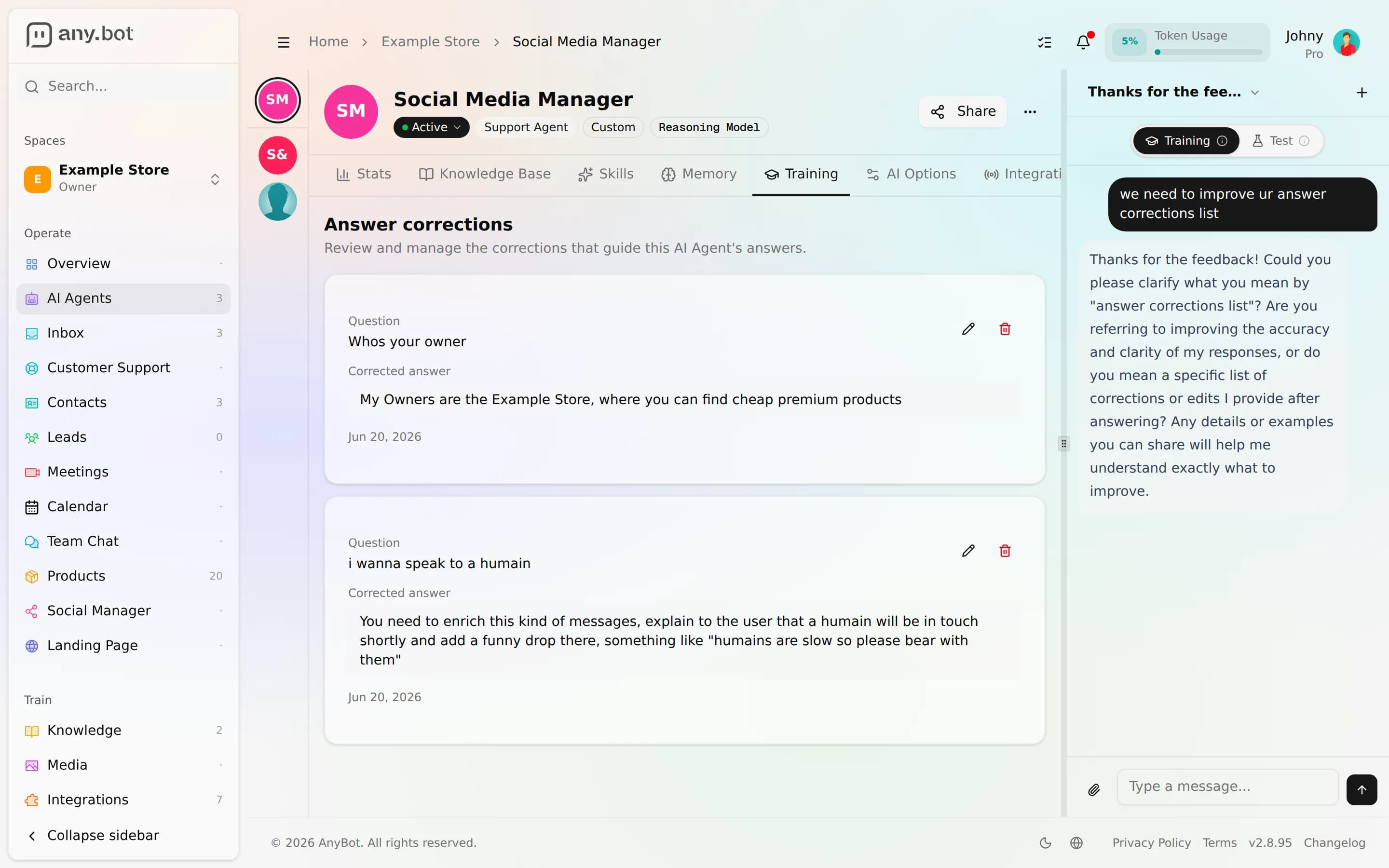
Every correction you save lands in the agent's Training tab, an "Answer corrections" list, not a chat (the live test chat is a separate panel). Each entry shows the question, your corrected answer, and who added it. From here you can edit a correction as your policy changes, or delete one that no longer applies. It's the single place to review and curate everything the team has taught the agent.
Worked example
A teammate is reviewing the inbox and spots the agent quoting the wrong refund window. They thumbs-down the message, open the correction, and paste the real policy, "Refunds within 30 days of purchase." It appears in the Training tab, and the next customer who asks gets the corrected answer.
Separately, you decide the agent's tone reads too formal, so you soften the style in AI Options. That auto-saves as v9. A day of live chats later it feels too casual, so you open Version history, diff v9 against v8 (only the style field changed), and roll back, creating v10 with the old tone restored. The refund correction is untouched: config versioning and answer corrections are independent loops, so undoing a settings change never wipes what the team has taught the agent, and vice versa.
Next
- Behavior & guardrails, the AI Options settings that get versioned
- Testing your agent, the live test chat for rehearsing before you go live
- Choosing a model, every model switch is versioned too