Train from your website
Crawl your entire site into your agent's knowledge base so it answers from your real content, grounded, never made up.
Point your agent at your website and let it read the whole thing. Each page becomes searchable knowledge the agent answers from, grounded in your real content, never invented. By the end you'll have a crawl that keeps itself fresh and an agent that declines rather than guesses.
What you'll build
An agent whose knowledge base is your live site. You'll add your URL, let AnyBot crawl it, turn on the grounding guardrail, and confirm in the test chat that answers come from your pages, and that off-topic questions get an honest "I don't know."
Before you start
- An agent to train. Don't have one yet? Follow Your first agent in 10 minutes.
- A publicly reachable website. Pages behind a login wall or that block crawlers can't be read.
- The Webchat channel enabled on the agent, the Chat panel's Test mode needs it (Step 5). Enable it from the agent's channels; see Embed web chat.
Steps
1. Open the Knowledge Base tab
Open your agent and select the Knowledge Base tab. This is where every source the agent can answer from lives, files you upload and websites you import.
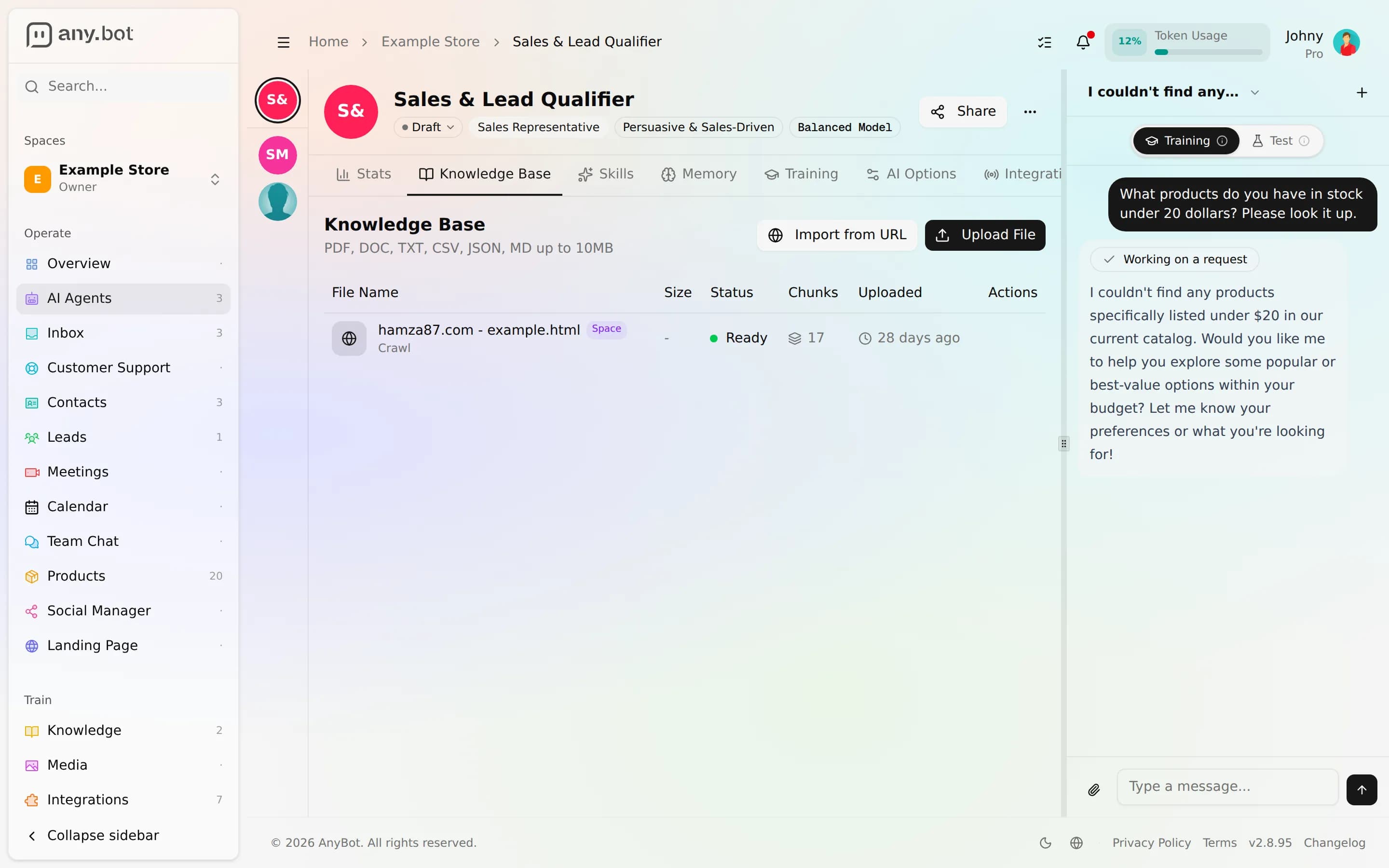
Expected result: You see the list of sources (empty on a fresh agent) with options to Upload a file and Import from a URL.
2. Import your website URL
Choose Import from a URL and paste your site address. On its own, a URL adds the pages AnyBot reads from that address. To ingest the whole site, connect the Website Crawler integration. It follows your internal links and pulls in every page it can reach, not just the one you pasted.
While connecting the crawler, optionally turn on scheduled refresh so it re-crawls on its own, daily, weekly, or monthly, and picks up new and changed pages automatically.
Expected result: Your site appears as a source (or a batch of pages) in the list, with a live Status. If you enabled a schedule, the source shows its refresh cadence.
3. Let the pipeline finish
Adding a source doesn't make it answerable instantly. Each page is fetched, split into sections, and embedded in the background before the agent can use it:
   Import URL (Website Crawler)
              │
              ▼
        Pending ──▶ Processing ──▶ Ready
                        │       (chunked, embedded, searchable)
                        ▼
                     Failed ──▶ delete + add again
Watch the Status column move from Pending to Processing to Ready. A Chunks count climbs as each page is indexed. More on the pipeline and scope: Knowledge base.
Expected result: Your pages read Ready. Only Ready sources are searchable, Pending and Processing pages aren't answerable yet.
4. Turn on grounded answers
Knowledge is only half of it. On the Behavior & guardrails page, turn on Answer only from my knowledge. Now the agent answers strictly from your crawled content and politely declines, or hands off, anything it can't find, instead of inventing an answer.
Expected result: The guardrail shows as enabled. The agent's grounding is now enforced, not just encouraged.
5. Test it in the Chat panel
Open the Chat with Agent panel, a side panel on wide screens, or the Chat button on smaller ones. Flip it to Test mode (it opens in Training by default) for a true customer-eye view. Ask something only your site covers, then ask something you know it doesn't. Replies stream in token by token. Full guidance: Testing your agent.
Expected result: The first question gets a grounded answer drawn from your pages; the second is declined or handed off, not fabricated.
Verify it works
- At least one crawled page reads Ready in the Knowledge Base tab.
- Answer only from my knowledge is on.
- A question your site covers returns a grounded answer in the Test-mode Chat panel.
- A question your site does not cover is declined or handed off, not invented.
- If you set a refresh schedule, the source shows its cadence.
Troubleshooting
- A page is stuck on Failed. Delete it and add it again. There's no separate retry button. Confirm the page loads publicly (no login wall) and isn't just a redirect.
- The crawl missed pages. Pages behind a login or that block crawlers are skipped. Confirm they load publicly, and that the Website Crawler integration is connected, a bare URL adds only the pages it can read from that address.
- The agent ignores a page you added. Confirm its status is Ready, not Pending or Processing, and that it's scoped to (or shared with) this agent. Then re-check the grounding guardrail and your phrasing in the test chat.
- The Chat panel asks you to enable webchat. Test mode needs the Webchat channel on the agent, enable it, then reopen the panel.
What's next
- Knowledge base, file types, shared library vs. per-agent scope, and the ingestion pipeline in depth.
- Testing your agent, what to check before you go live.
- Build a booking agent, add a public-safe action on top of your trained agent.