Billing & ABT
How AnyBot meters every kind of AI work as one normalized unit, AnyBot Tokens (ABT), and how plans, pools, and promo codes fit together.
Cette page n’est pas encore traduite, la version anglaise est affichée.
Every agent reply, generated image, or assistant chat runs on a different AI model with its own provider pricing. AnyBot hides all of that behind one normalized unit of work: AnyBot Tokens (ABT). Whatever model does the work, the cost is converted to ABT and metered against your plan, so you reason about a single number instead of a dozen provider price lists.
AnyBot meters AI work as ABT across 6 pools. Your plan sets the monthly allowance, see ABT tokens and plans.
How metering works
Each AI call returns the underlying provider's input and output token counts. AnyBot applies that model's rate to convert them into ABT, then debits the total from the matching pool in your plan's allowance:
Provider tokens (in / out) → model rate → ABT → pool quota → usage dashboardYour plan sets the allowance; usage draws it down as you work; the dashboard shows how much is left. If a pool runs out before its window resets, the workspace's payer can buy a one-off token top-up from the billing area instead of changing plan.
The pools
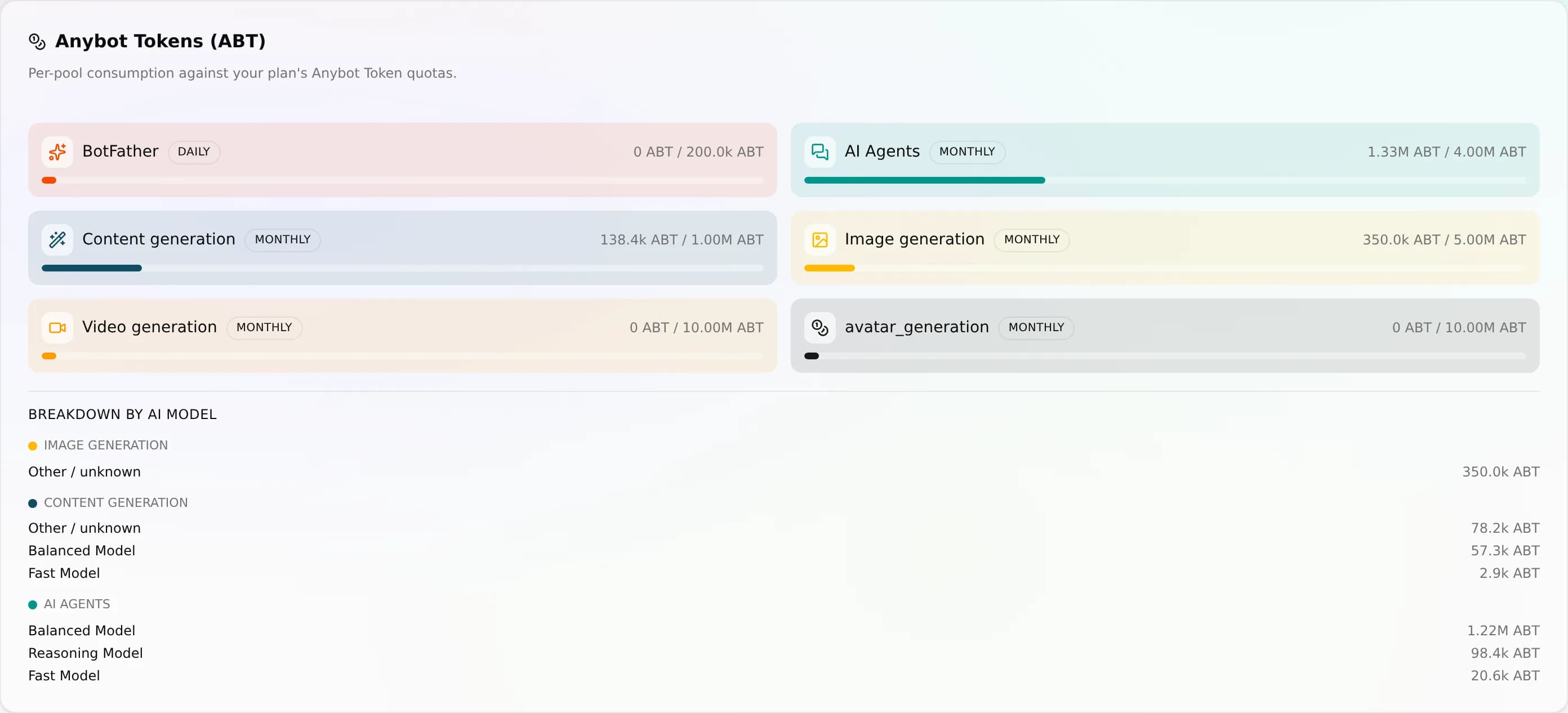
AI work is split across 6 ABT pools so heavy work in one area never starves another. Each pool is windowed to your own billing date:
| Pool | Window | Meters |
|---|---|---|
| In-app assistant (BotFather) | Daily | Your chats with the in-app assistant |
| Customer conversations | Monthly | Replies your agents send to customers |
| Content generation | Monthly | Text work: suggestions, rewrites, social copy |
| Image generation | Monthly | Images you create in Media Studio |
| Video generation | Monthly | Generated video clips |
| Avatar / presenter | Monthly | Talking-head presenter video |
How the pieces fit together
Billing has three moving parts. Your plan sets the allowance and the seat, agent, and knowledge limits; ABT pools meter each kind of AI work against that allowance; promo and referral codes change what you pay at checkout. All three are scoped to one workspace: a subscription belongs to the workspace, not to the person who bought it, so a second workspace is a second subscription with its own invoice.
| Piece | What it does | Where you manage it |
|---|---|---|
| Plan | Sets your ABT allowance plus feature and seat limits, per workspace | Plans · Stripe checkout |
| ABT pools | Meter each kind of AI work, windowed to your billing date | ABT tokens usage dashboard |
| Promo & referral | Adjust the price applied at sign-up / checkout | Promo & referral |
Plans differ by dimension: how many agents and team members you get, how much knowledge you can store, how large your AI allowance is, and which modules are switched on. Channels and media storage are not differentiators: channels are unlimited and storage is identical on all three tiers. Higher plans lift the rest; for current prices and exact per-plan limits, see the billing area of your workspace rather than these docs.
In this section
- Plans: the plans (Go, Starter, Pro, Advanced, Enterprise), monthly or yearly billing per workspace, Stripe checkout, and the difference between a count limit and an ABT pool running out.
- AnyBot Tokens (ABT): the 6 ABT pools in detail, each pool's window, and the used-versus-included usage dashboard with its per-model breakdown.
- Promo & referral codes: apply promo codes at checkout, and share personal referral codes as QR cards.
Next
- Start with Plans to pick a tier. A card is collected at checkout, and each workspace subscribes separately.
- See how usage is metered in AnyBot Tokens (ABT).
- Save at checkout with Promo & referral codes.
Notifications
22 types d'événements dans 9 domaines, chacun livrable dans l'application, par e-mail ou par push web, avec des préférences par type.
Forfaits
Comment les forfaits AnyBot se comparent, plus le cycle de facturation (au mois ou à l'année), la facturation par espace de travail et la mise à niveau.