AI Studio
Ten brand-voice-aware tools that create and optimize social content, captions, hashtags, images, video scripts, threads, and more.
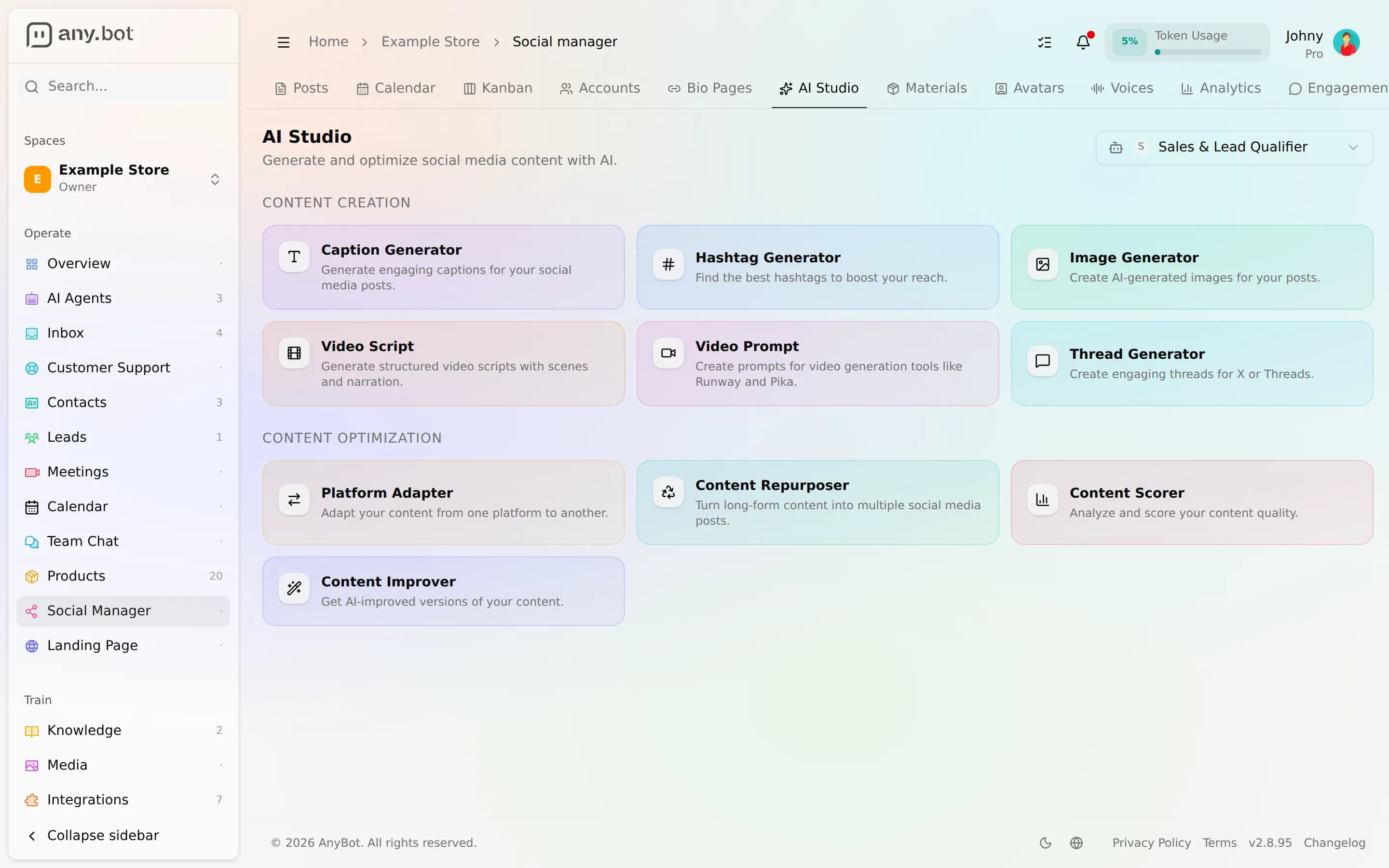
AI Studio is a grid of ten single-purpose tools that write and reshape social content for you. Six of them create from a brief; four optimize content you already have. Every tool runs on one of your agents, so the output carries that agent's brand voice and knows what the agent knows, the same persona your customers already talk to, now writing your posts.
Before you start
- You need the
manage_socialpermission in the space, Owners and Admins have it (see roles & permissions). - You need at least one agent in the space. AI Studio asks you to pick one first: that agent's persona is the brand voice, and its knowledge is pulled in as context so captions and scripts get your facts right, not generic filler.
- These tools run on your platform AI allowance, so heavy use is metered like any other AI work, see Plans & billing.
Create (6 tools)
Each create tool takes a short brief, a topic, a concept, a rough idea, and returns finished, on-brand content.
- Caption, social captions for your topic, with relevant hashtags folded in and an optional tone.
- Hashtags, a ranked set of tags for a topic, tunable by count, per-network, and style (popular, niche, or mixed).
- Image, generate an on-brand visual through the same in-house image pipeline the rest of the platform uses. This one is live; see Media Studio for the full image process.
- Video script, a structured short-video script: title, hook, scene-by-scene beats, a call to action, a music mood, and hashtags.
- Video prompt, a refined generation prompt (with a negative prompt, aspect ratio, and a suggested duration) ready to feed a video model.
- Thread, a multi-post thread built out from a single idea.
The image tool generates real images. The video script and video prompt tools produce text you can act on, and you can turn that text into a clip with Video generation.
Optimize (4 tools)
Each optimize tool takes content you already have and reshapes it.
- Platform adapter, reshape one post for a specific network's format and norms, returning adapted text, fresh hashtags, and suggestions.
- Repurposer, turn one long-form piece (a blog post, newsletter, or transcript) into several short posts.
- Scorer, rate a draft from 0 to 100 with a per-dimension breakdown and a short list of actionable fixes.
- Improver, rewrite a draft toward a goal you name (concise, punchier, more on-brand) and get back a few variants to choose from.
How to use it
- Open Social → AI Studio and pick the agent whose voice you want at the top of the page.
- Choose a tool from the Create or Optimize grid.
- Fill in the brief, a topic for a create tool, or paste your draft into an optimize tool, and set any options the tool offers.
- Generate. The result appears inline; not happy with it, hit Regenerate to re-run the same inputs for a fresh take.
Every run is saved to that tool's history on your device, so you can reopen a recent result without regenerating it. Switching the agent switches the voice, the same brief written by a different agent reads differently.
Where the output goes
AI Studio hands you finished text and images; it doesn't publish anything on its own. Take a caption, thread, or image into the composer to build the post, then schedule and publish it from the planner & calendar. If you'd rather draft conversationally, the composer has its own AI chat pane that edits your draft in place, AI Studio is the toolbox, the composer is the workbench.
Next
- Composer, build the post around what you generated.
- Planner & calendar, schedule and publish it.
- Media Studio, the full image and video process.