Agent Stats
The per-agent Stats tab, headline volume, resolution and outcome analytics, and the top questions your agent couldn't answer.
Cette page n’est pas encore traduite, la version anglaise est affichée.
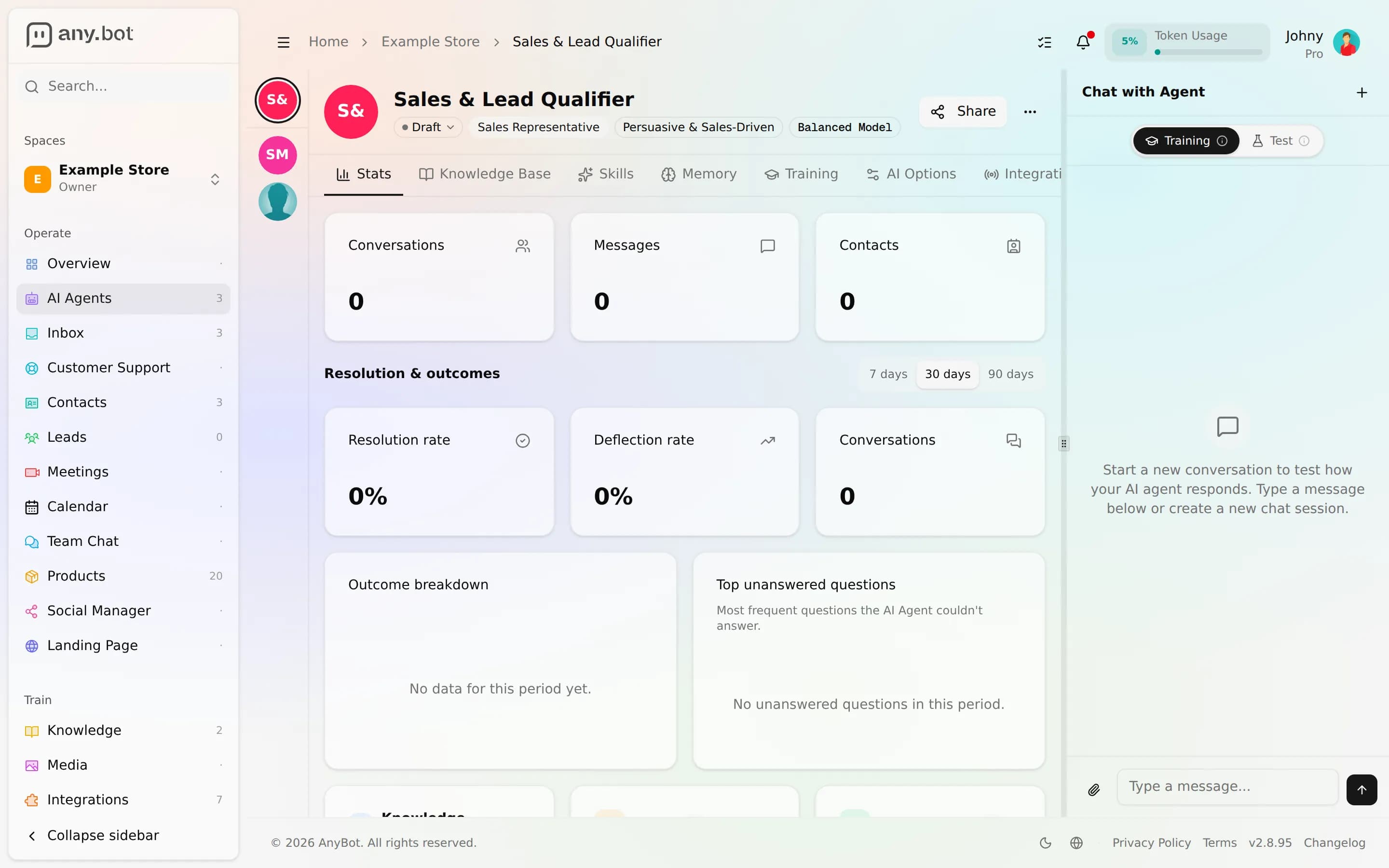
The Stats tab is the scoreboard for a single agent. Open an agent, switch to Stats, and you get its volume at a glance, a resolution-and-outcomes breakdown, and a ranked list of the questions it couldn't answer, everything you need to decide what to fix next, all scoped to that one agent.
The headline counts
At the top of the tab sit three always-on cards that count everything the agent has ever handled:
- Conversations: distinct chats the agent has taken part in.
- Messages: total messages exchanged.
- Contacts: people it has spoken with.
Below the analytics (covered next) a set of recap cards mirror the rest of the editor (Knowledge Base, Skills, and Integrations), each showing what's currently attached and linking straight to that tab so you can jump from a number to the thing behind it. A Recent Activity panel rounds out the bottom of the tab.
Resolution and outcomes
The heart of the tab is the Resolution & outcomes block. Pick a time window: 7 days, 30 days, or 90 days (30 days by default), and every number below recalculates for that range.
Three metrics headline it:
- Resolution rate: how often the agent resolved a conversation on its own, as a percentage.
- Deflection rate: the share of conversations it handled without needing a human.
- Conversations: the volume in the selected window (so the rates have context).
Underneath, an Outcome breakdown splits every conversation in the window into three buckets:
- Answered: the agent handled it.
- Couldn't answer: it hit a gap it couldn't fill from your knowledge.
- Escalated: it handed the conversation to a human.
Read together, a healthy agent shows a high Answered slice and a resolution rate trending up as you add knowledge and tune guardrails. A growing Escalated slice usually points to a missing ability or a topic you've asked it not to answer.
Top unanswered questions
The most actionable panel on the tab is Top unanswered questions, the most frequent questions the agent couldn't answer in the window, ranked by how many times each came up. This is your backlog, in priority order.
Work it top-down:
- Take the highest-count question.
- Add the missing answer to the Knowledge Base (a document, a page, or an FAQ).
- Or, if the agent should have answered but got it wrong, fix the answer in the Training tab (see Versioning & feedback).
- Re-check the list next week. The count should drop.
Because every configuration change is auto-versioned, you can adjust the agent freely and roll back if a change doesn't help. (Knowledge-base edits aren't versioned, but you can always delete a source and re-add it.)
Per-agent, not space-wide
Stats is deliberately narrow: everything on this tab describes one agent. If you run several agents in a space, each has its own Stats tab with its own numbers.
For the whole-space picture (every agent, the full inbox, contacts and leads together), use the space Overview in the Operate group, described in The dashboard tour. Conversations themselves live in the Unified Inbox. Think of it as two zoom levels: Overview for the space, this Stats tab for a single agent.
Next
- Knowledge base, close the gaps the top-unanswered list surfaces
- Versioning & feedback, approve, edit, or reject past answers in Training
- Behavior & guardrails, tune escalation so the outcome mix improves
- The dashboard tour, the space-wide view that sits above this tab
Versionnage et retours
Chaque changement de configuration est versionné automatiquement avec un diff au niveau du champ et un retour arrière en un clic, aux côtés des retours sur les réponses et des analyses de lacunes.
Attachments & multimodal
Beyond text, how an agent understands voice notes, images, and documents a person sends mid-conversation.