Choosing a model
Pick the right model bundle for your agent, speed versus quality, why the names are bundles rather than raw model IDs, and how automatic fallback keeps replies flowing.
Esta página ainda não foi traduzida, exibindo a versão em inglês.
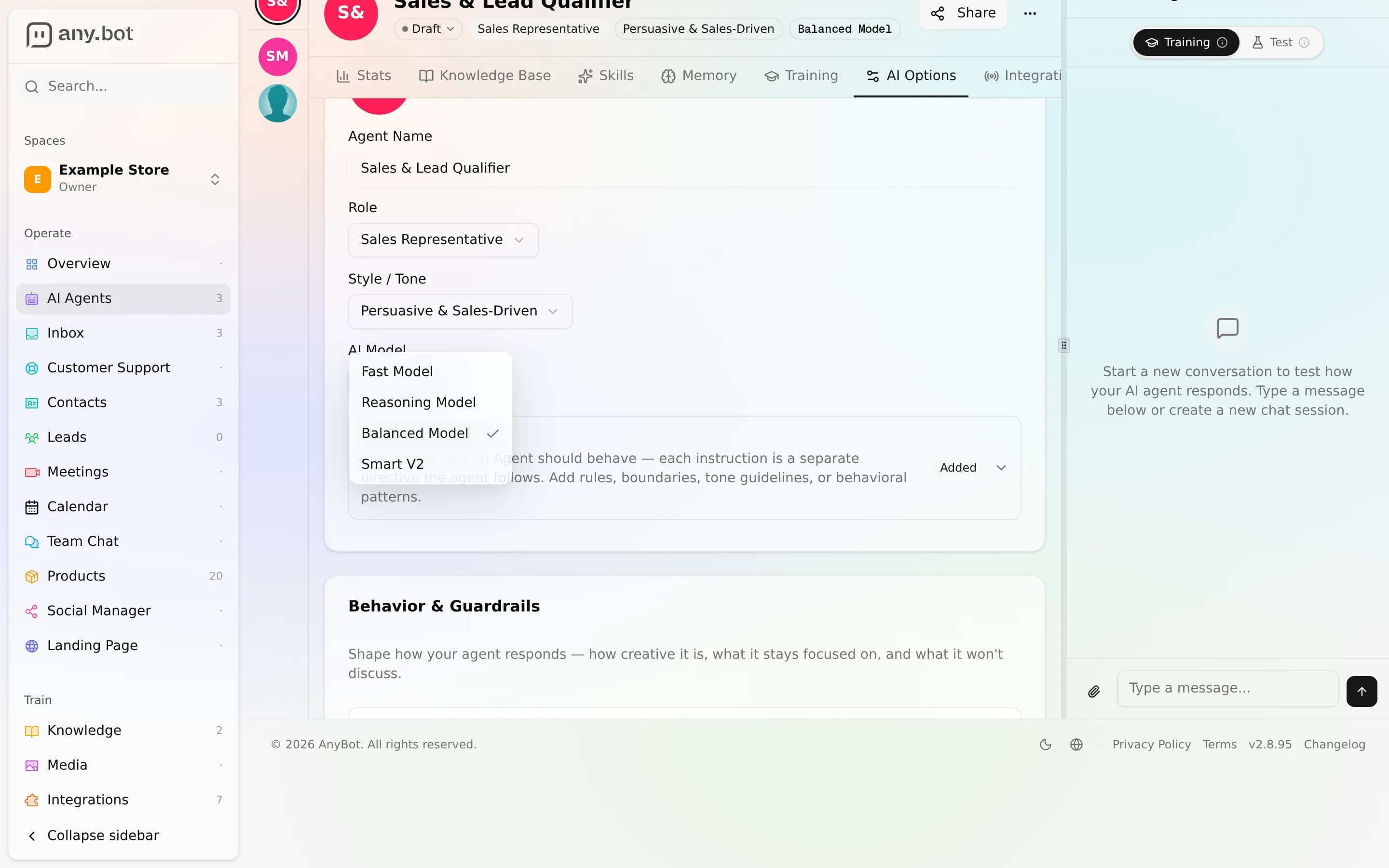
Every agent runs on a model bundle, the brain behind its replies. You pick one in the agent's AI Options tab, and it's a single, plain-language choice: no model version strings, no provider accounts, no keys to manage. This page explains what the bundles are, how they differ, and how to pick.
Bundles, not model names
You don't choose a specific model like a version number. You choose a bundle. A bundle is a named tier (for example, Balanced Model) that AnyBot maps to one or more underlying models behind the scenes. Two reasons this matters:
- It stays current. When a better model becomes available, AnyBot re-points the bundle to it. Your agent gets the upgrade without you editing anything.
- It's built to stay resilient. Bundles are defined with a primary and a backup model; automatic cross-model fallback is arriving (see Automatic fallback).
So you're choosing a profile ("fast", "balanced", "reasoning", "top-tier"), not a frozen model ID. The exact lineup is curated by AnyBot and can change over time.
The bundles
There are four bundles, spanning a spectrum from fastest to most capable:
| Bundle | Best for | The trade-off |
|---|---|---|
| Fast Model | High-volume support, FAQs, quick back-and-forth | Quickest replies; lighter reasoning |
| Balanced Model | Most agents, the sensible default | A middle ground of speed and depth |
| Reasoning Model | Complicated agents, multi-step questions, careful tool use | Deeper reasoning; slightly slower |
| Smart V2 | The most demanding agents that need maximum capability | Highest quality; heaviest |
Each is described in plain terms right in the picker, so you can read the short blurb and choose without knowing anything about the models underneath.
Automatic fallback
How to pick
A simple way to decide:
- Start with Balanced Model. For the large majority of support and sales agents it's the right default, fast enough to feel snappy, capable enough to handle real questions and use tools well.
- Reach for Fast Model when volume and latency matter most and the questions are relatively simple. Think first-line FAQ deflection where speed is the whole point.
- Move up to Reasoning Model when your agent has a lot of knowledge, chains several tools, or fields nuanced, multi-step questions and you notice it cutting corners on the harder ones.
- Choose Smart V2 for the most demanding agents, where answer quality outweighs both speed and cost.
The honest way to choose is to try it, not guess it. Pick a bundle, then open the live test chat and run your trickiest real questions through it. If replies feel slow, step down a tier; if they feel shallow on the hard ones, step up. The right bundle is the cheapest one that still answers your questions well.
Changing the model later
The model isn't a one-time decision. Switch bundles anytime from AI Options, and (like every agent change) it's auto-versioned, so you can compare behavior and roll back in one click if a switch doesn't suit you. A good loop:
- Change the bundle in AI Options.
- Re-run your test questions in the test chat.
- Keep it, or roll back from the version history.
Model choice pairs closely with your behavior settings: creativity (temperature), answer-only-from-knowledge, and escalation all live beside it. A more capable bundle follows tight guardrails just as faithfully as a fast one, so tune both together.
Next
- Behavior & guardrails, the other AI Options settings: creativity, blocked topics, and escalation
- Testing your agent, the live streamed test chat, the right place to compare bundles
- Versioning & feedback, every model switch is versioned with one-click rollback