Capture and work leads
Let your agent quietly turn an interested visitor into a lead mid-chat, ping you the moment it happens, and hand you the thread to close.
Esta página ainda não foi traduzida, exibindo a versão em inglês.
The best lead capture doesn't feel like a form. In a normal conversation your agent notices interest, quietly saves the visitor's contact details as a lead, a public-safe write, so it works even on a fully public chat, then notifies you so you can pick the thread up and work it. This tutorial wires that loop end to end. It takes about ten minutes on an agent you already have.
What you'll build
An agent on a public channel that captures a lead silently, no interruption to the visitor, then reaches you through the bell and a push notification. You'll trigger a capture as a test visitor and then work that lead from start to finish.
Visitor chats ─▶ agent detects intent ─▶ capture lead (public-safe, silent)
                                                │
                                new lead in Contacts & Leads
                                                │
                             Leads notification (bell + push)
                                                │
                    you open it ─▶ work the thread in the Inbox
                                   move the lead  New ─▶ … ─▶ Converted
Before you start
- A working agent. New here? Build your first agent first.
- The agent on a channel a visitor can reach. Web chat is the zero-setup option and also gives you a live test panel.
- Your role can see and work the inbox (view inbox + reply inbox), see Roles & permissions.
How the silent capture works
Capturing a lead is one of the tiny set of safe writes. It only ever creates the visitor's own record, so a stranger on a public channel can trigger it without risk. That's why the call is hidden from the public chat stream: the visitor sees a normal reply, never a "tool step". The new lead lands in your Contacts & Leads and fires a Leads notification. It's native to AnyBot, no CRM required. For the full public-safe vs owner-only split, see Abilities.
Steps
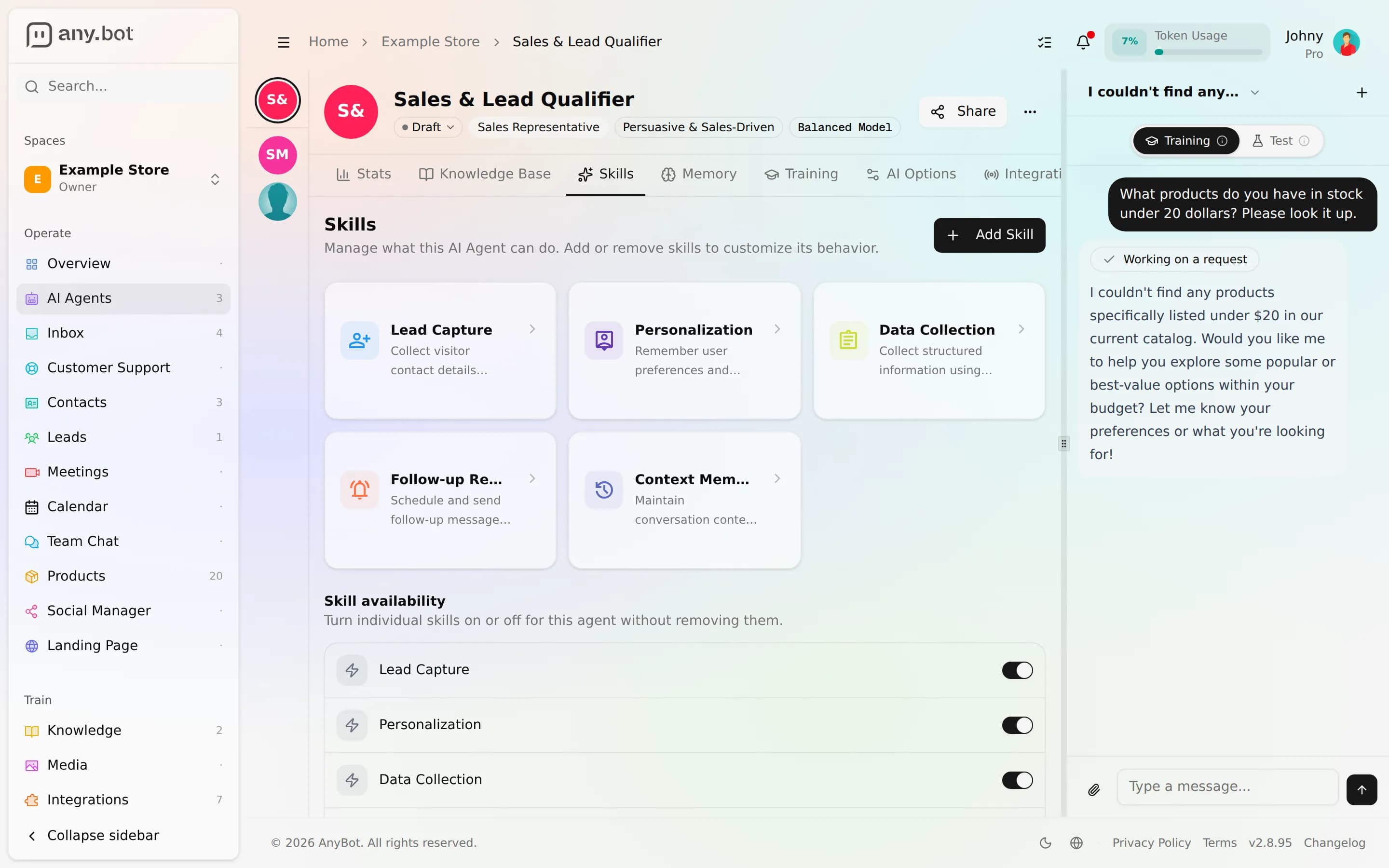
1. Enable the lead-capture ability
Open your agent, go to the Skills tab, and attach the Capture lead ability. It's marked public-safe, so no HubSpot or other integration is required.
Expected result: The ability shows as attached and enabled, tagged public-safe. It's one of the 27 public-safe tools.
2. Tell it when to capture
In Behavior & guardrails, add a line like "When a visitor shows buying interest, ask for their name and email or phone, then capture the lead." The agent still decides when to reach for the tool. This shapes the moment.
Expected result: When a test message shows interest, the agent asks for a way to reach you.
3. Put the agent on a public channel
Enable web chat on the agent (or any channel a visitor uses). Enabling web chat also unlocks the Chat with Agent test panel.
Expected result: The channel is enabled on the agent. (For web chat there's no external connect step. It's a toggle on the agent's Integrations tab.)
4. Trigger a capture as a visitor
Open the public web-chat widget (or the test panel), express interest, and when prompted, give a name and an email or phone number.
Expected result: The agent acknowledges and moves on, and to the visitor the capture is invisible, with no tool step in the public stream. (In your own test panel you may see the step, since owners get full visibility.) A new lead now exists.
5. Get notified, then work the lead
Leads default to the bell and push, so the capture reaches you right away, allow browser push once to get it even with the tab closed (Notifications). Click the notification to jump to the lead. From there:
- In Contacts & Leads, move it along the New → Contacted → Qualified → Converted pipeline as you qualify and close it.
- In the unified inbox, open that visitor's conversation, Take over from AI, reply, Assign it to a teammate, and set its status, then Return to AI agent when you're done.
Expected result: A "lead captured" notification appears; you can advance the lead's stage and continue the conversation as a human.
Verify it works
- The Capture lead ability is attached and enabled on the agent.
- Posing as a visitor and giving contact details created a lead.
- The visitor's chat showed no tool step, the capture stayed silent.
- A Leads notification hit the bell (and push, if you allowed it).
- You opened the lead and can move it through the pipeline and reply in the inbox.
Troubleshooting
- No lead after the visitor gave details, confirm Capture lead is enabled on that agent, and that a usable name plus email or phone was actually provided.
- No notification, the bell keeps every lead; if nothing pushed, allow browser push and check the Leads push toggle in Notifications.
- A tool step showed to the visitor. That shouldn't happen on a public channel; the capture is hidden there. Seeing it in your own test panel is expected (owners get full visibility).
- Lead's there but you can't work the thread. You likely have view inbox but not reply inbox; ask an owner to grant it.
What's next
- Abilities, the full public-safe vs owner-only picture, and the other safe writes.
- Unified inbox, take over, assign, and hand back without the customer noticing.
- Notifications, tune exactly how leads and escalations reach you.
- CRM, HubSpot, push contacts into HubSpot too, from an owner-only internal agent.
- Build a booking agent, the other public-safe write, letting visitors book time.
Crie um agente de agendamento
Deixe seu agente oferecer horários livres e agendar compromissos de qualquer canal, sem expor sua agenda.
Sell products in chat
Sync a WooCommerce catalogue or crawl your site so your agent recommends real products, quotes as-of-sync prices, and hands the shopper to your real checkout.