Unified inbox
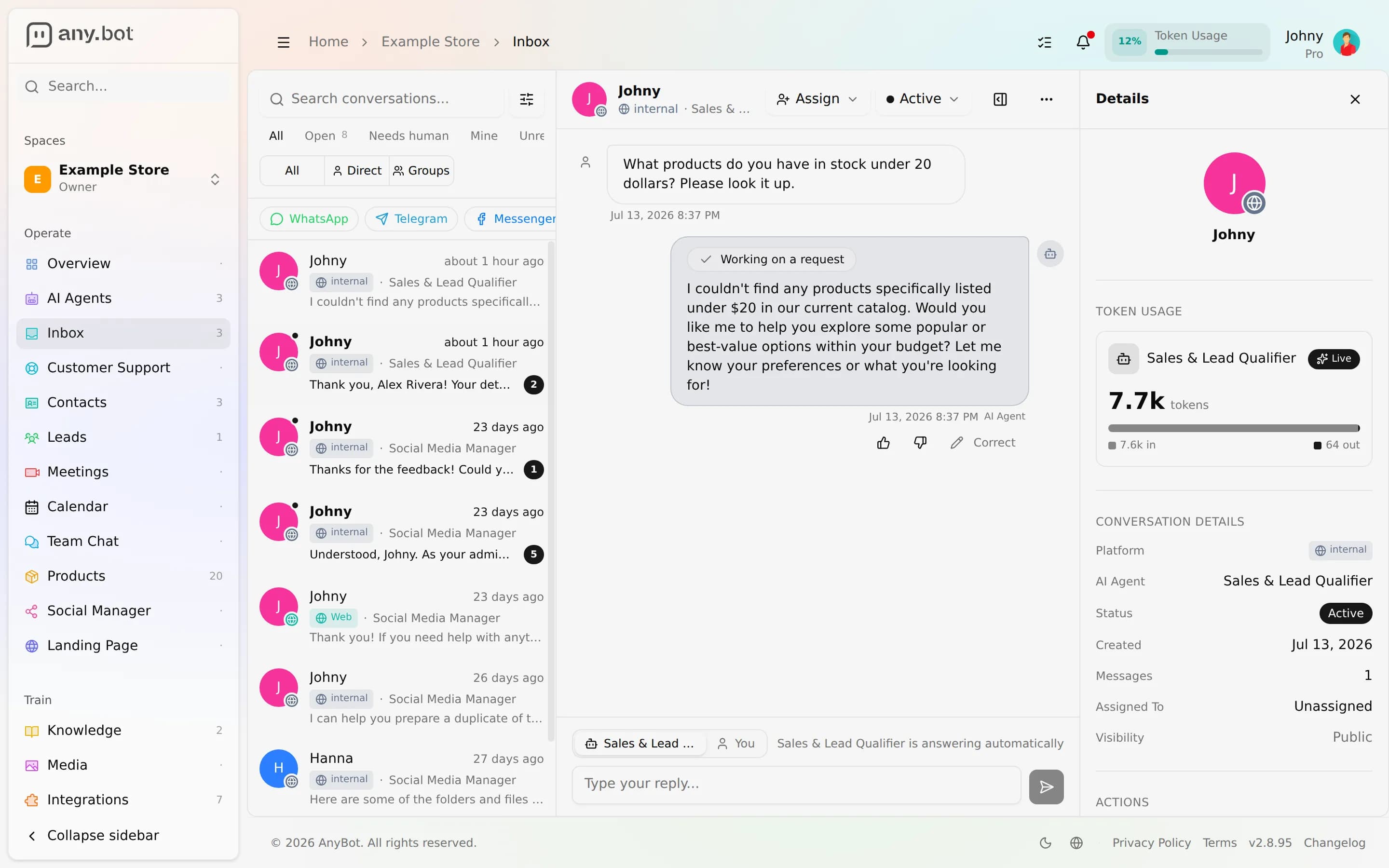
Every channel's conversations land in one inbox, with AI auto-reply, one-click human take-over and hand-back, per-contact AI mute, assignment, and status.
Cette page n’est pas encore traduite, la version anglaise est affichée.
However a customer reaches you (a WhatsApp thread, a Meta webhook, an email, an SMS, or the web-chat widget) the message is normalized into one inbox. Every conversation looks the same regardless of channel, the AI answers by default, and any teammate can step in, take over, and hand back without the customer noticing the seam. This is where 8 channels become a single queue.
Before you start
- Connect at least one channel. The inbox fills as messages arrive.
- Your role needs view inbox to open it and reply inbox to answer, take over, assign, or change status. Both are grantable per member. See Roles & permissions.
Open the inbox
- Open your space and click Inbox in the sidebar.
- Pick a conversation from the list. The thread opens with its full history and a live message stream.
- Use the filter chips across the top to narrow the list: All · Open · Mine · Unread · Closed, plus Needs human. Each chip's number equals exactly what it would list. Direct / Groups splits 1:1 threads from group chats, and you can further filter by Platform, AI Agent (which bot), and Assigned to.
Take over from AI, then hand back
By default the AI agent answers automatically and the thread shows that it "is answering automatically". To step in:
- Open the conversation and click Take over from AI.
- AI replies pause for that conversation. The thread gets a Needs human badge and the banner "AI replies are paused, handed off to a human". The composer notes "You're replying · AI Agent muted for this contact". This is the per-contact AI mute: the bot stays quiet for that contact on that channel until you hand back.
- Reply as much as you need. When you're done, click Return to AI agent. The bot resumes auto-replying.
You don't even have to click Take over first: your first reply implicitly takes the conversation over, so a bot answer can never race a human who's typing. The agent can also raise its own hand. It escalates when a customer asks for a person, when its answer isn't well-grounded, or when it finds no answer, but only a human action produces the "a team member took over" reason.
Assign and set status
- Assign a conversation to a teammate (or Unassign) so it's clear who owns it; assigned threads show under the Mine chip for that person.
- Status moves a thread through Active → Closed → Archived. A closed or archived thread shows a hint in the composer and a Reopen action; reopening returns it to Active.
- Mark as read clears a thread's unread count.
Assignments, take-overs, hand-backs, and status changes are all written to the space audit log (actor and refs only, never the message body).
In a conversation
| You can | Notes |
|---|---|
| Reply with text or media | Delivered back out on the conversation's own channel |
| See per-contact token usage | Live in / out totals, and a Muted marker while you've taken over |
| Read every channel the same way | WhatsApp, Instagram, Telegram, Slack, email, SMS, voice, and web chat all render as one thread with platform badges |
Channel settings recap
Whether the AI even auto-replies is governed per channel (auto-reply, greeting, business hours, out-of-hours, and reply rate). When auto-reply is off, inbound messages still land here for a human and the bot stays silent. See Channel settings. Those gates apply only to the AI reply. A human can always answer from the inbox.
Troubleshooting
- A conversation is missing. Check the active filter chip and any Platform / Agent / Assigned-to filter. Click Clear filters. Closed and archived threads are hidden unless you select them.
- The bot won't reply on a thread. It's probably taken over (Needs human badge). Click Return to AI agent. Otherwise check that channel's auto-reply and business hours.
- I can see the inbox but can't reply. You have view inbox but not reply inbox. Ask an owner or admin to grant it.
- My reply didn't reach the customer. Confirm the underlying channel is still connected; a reply delivers on the conversation's original channel.
FAQ
Does taking over notify the customer? No, replies come from the same agent identity on the channel. The hand-off is invisible to them.
Can two people work the same inbox? Yes. Assign threads to divide the work; another operator's reply live-echoes into any open view.
Is "muting the AI" global? No. It's per conversation (that contact on that channel). Other conversations keep auto-replying.
Who can access the inbox? Anyone with the view inbox permission; replying, assigning, and status changes need reply inbox. See Roles & permissions.
Next
- All channels: connect WhatsApp, Telegram, email, and more
- Channel settings: auto-reply, greeting, and business hours
- Roles & permissions: who can see and work the inbox
- Audit log: the record of take-overs, assignments, and status changes