Web chat widget
Embed a brand-themed chat widget on your site, zero setup, no tokens, guest sessions, and public-safe by design.
Diese Seite ist noch nicht übersetzt – die englische Fassung wird angezeigt.
The web chat widget is an embeddable, brand-themed chat for your website. There's zero setup, no tokens or API keys to manage. Visitors chat as guests (no login), replies stream live, and the launcher self-configures from your saved settings, so editing the color, greeting, or icon takes effect without re-pasting the snippet. Because guests run only public-safe abilities, a visitor can never reach your private data.
Before you start
- The agent needs the Web Chat channel enabled (it's on the agent's Integrations tab).
- Have access to edit your site's HTML. You'll paste one
<script>tag before</body>. - Decide up front whether you want to restrict embedding to specific domains and whether to ask visitors for a contact before they chat.
Add it to your site
- Open the agent, go to Integrations, and find the Web Chat card.
- Click Embed in website to open the embed dialog.
- Click Copy code and paste the snippet just before the closing
</body>tag on every page where the widget should appear.
The snippet is a single tag. The dashboard fills in your agent's ID (BOT_UID) and the right AnyBot host, so copy it verbatim:
<script src="https://app.any.bot/widget.js" data-anybot="BOT_UID" async></script>It loads the AnyBot widget, which adds a floating launcher to the page; a click opens the chat (full screen on phones, and Escape closes it). The widget's code is served by AnyBot rather than pasted into your page, so fixes and your appearance settings reach your site without re-pasting. If you pick a theme in the embed dialog, the tag also carries a data-theme attribute; changing the theme later is the one change that needs the tag copied again.
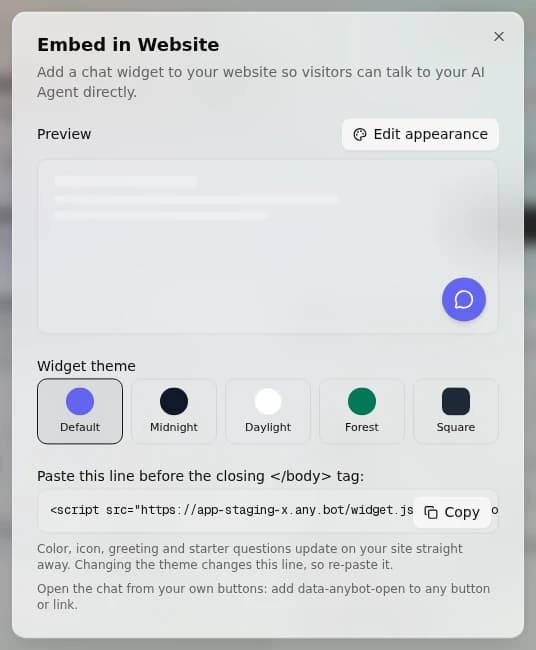
Open the chat from your own buttons
Add data-anybot-open to any element on your page, such as a "Chat with us" button or a link in your header, and a click on it opens the chat. No extra script is needed.
<button type="button" data-anybot-open>Chat with us</button>From your own JavaScript, the widget also offers window.AnyBotWidget.open(), close() and toggle().
Customize the widget
Appearance and behavior come from the Web Chat channel settings and are served on the public bot-info endpoint the widget fetches. Editable fields:
| Setting | What it controls |
|---|---|
theme_color | Launcher and accent color |
launcher_position | bottom-right or bottom-left |
launcher_icon_url | Custom launcher icon (defaults to a chat glyph) |
header_title | Title shown at the top of the chat panel |
welcome_bubble | Greeting teaser above the launcher |
input_placeholder | Placeholder text in the message box |
show_branding | "Powered by" toggle |
These live alongside the shared per-channel controls. See Channel settings for greeting, business hours, and out-of-hours.
Restrict where it can be embedded
Add an allowed-domains list to the channel and only those sites may load the widget. A request from any other domain is refused (403). It's enforced server-side on every guest request (Origin/Referer checked), so it can't be bypassed by editing the snippet. An empty list means unrestricted. Your own AnyBot dashboard origin is always allowed, so the owner preview never gets blocked.
Capture a contact before chat
Turn on pre-chat capture to gate the conversation behind a short form. Choose any subset of name, email, and phone; the visitor fills them in before the first message, and the values seed the contact. This is one of the small set of public-safe writes. See Privacy by design below.
On this channel
- Receives: typed messages from guest visitors.
- Sends: streamed text replies, with tool-call steps and 👍/👎 feedback; images the agent generates render inline.
- Sessions: guests keep their conversation across page reloads on the same device.
Privacy by design
Guest visitors run only public-safe tools, currently 27 of the platform's abilities. A visitor can never make the agent read your inbox, CRM, or finance data. A small, deliberate subset of public-safe tools are writes (lead capture, appointment booking). Everything sensitive stays owner-only. See Security.
Troubleshooting
- Launcher doesn't appear: confirm the
<script>is before</body>and that the Web Chat channel is enabled for this agent. 403when the widget loads: the page's domain isn't in the allowed-domains list. Add it (or clear the list to go unrestricted).- Launcher shows the default color and icon: the page still has the older multi-line snippet. Replace it with the one-line tag from Copy code.
- Styling changes didn't apply: the widget reads settings at load; hard-refresh the page. You don't need to re-paste the tag to pick up new settings, except after changing the theme.
- Visitors stuck on a form: pre-chat capture is on; every listed field is required before chat starts.
FAQ
Do I need an API key? No, zero setup. The tag carries your agent's ID and nothing else.
Can visitors trigger sensitive actions? No, only public-safe abilities, plus the deliberate public-safe writes like lead capture and booking.
Can I limit which sites embed it? Yes, the allowed-domains list; empty means any site.
Will editing settings break the embed? No, the widget self-configures on each load, so color, icon, and greeting update without touching the snippet.
Can my own button open the chat? Yes. Add data-anybot-open to any button or link, or call window.AnyBotWidget.open().
Next
- Channel settings: greeting, business hours, and out-of-hours
- All channels: connect WhatsApp, Telegram, email, and more
- Abilities: what public-safe tools your agent can run
- Security: the owner-only vs public-safe model
Sprachanrufe
Weise eine Telefonnummer zu und dein Agent geht ans Telefon. Er begrüßt den Anrufer mit einer synthetisierten Stimme, transkribiert, was er sagt, antwortet laut und führt eine echte gesprochene Unterhaltung.
Integrationen – Übersicht
Gib deinem Agenten echte Tools, mit denen er handeln kann, verbinde eine App, erteile Zugriff, und er gewinnt Fähigkeiten. Jedes Tool ist von Grund auf public-safe oder owner-only.